
Hello, dev! Let's start one more sequence of exciting technical posts related to the NestJS ecosystem, and in this sequence, I am going to review and exercise with you concepts like:
The idea is to only go through some parts of the application, ok? I recommend this post for those who have some knowledge about NestJS already and want to see & apply a different architectural approach to have applications with as little coupling as possible.
There's another post that I wrote in the past, that also applied this approach of less coupling. If you want to take a look the link is
Creating Smart Questions with NestJS and OpenAI
What is going to be the project?
This is a simple project that represents part of an e-commerce ecosystem. We are going to design a solution with four basic entities, they are
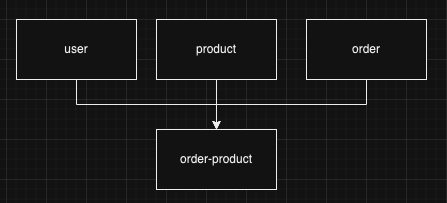
Plus, we will integrate this solution with the Stripe payment platform and a Cache layer for the GET endpoints to respond faster! 🏃🏻♂️💨
Start 🎬
For this project, I am going to use a few different technologies for two reasons:
- I want to share how Clean Architecture can help a project not rely on the technology; For example, if you want to change the database, or payment provider… it is going to be very simple.
- To have a clear project pattern applied;
The technologies are going to be:
- NestJS
- MongoDB
- Postgres
- SWC
I am starting this project, following the same steps that I have shown in this post (I just skipped the deploy step)
Implementing auth flow as fast as possible using NestJS
With the project created and the setup done, we can organize the folders and the main files. The final version is gonna be like this:
assets
├── prisma
└── src
    ├── application
    │   └── ecommerce
    │       ├── ports
    │       └── use-case
    ├── core
    │   └── entities
    ├── domain
    │   └── ecommerce
    └── infra
        ├── env
        ├── http
        │   └── dto
        ├── payment
        │   └── stripe
        └── persistence
            ├── cache
            │   └── interceptor
            ├── mongoose
            │   ├── entities
            │   ├── mapper
            │   └── repositories
            └── prisma
                ├── mapper
                └── repositories
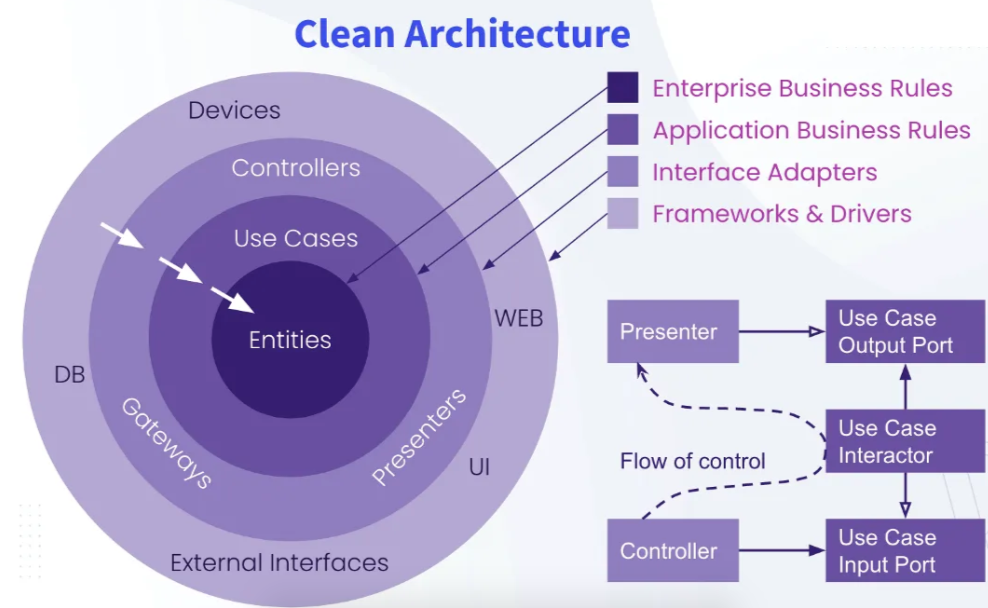
To start with something visual, let's start with the infra/http This HTTP, represents one of the external layers that compound the architecture, so, everything related to external technologies, for example, databases, presenters, and libraries, will be inside this folder.
To make things clear, we are following this diagram. (don't worry about everything else yet)
As HTTP is a module, let's create a module and its related files
http
├── app.controller.ts
├── checkout.controller.ts
├── dto
│   ├── create-order-product.dto.ts
│   ├── create-order.dto.ts
│   ├── create-product.dto.ts
│   └── create-user.dto.ts
├── http.module.ts
├── order.controller.ts
├── product.controller.ts
├── user.controller-e2e-spec.ts
└── user.controller.ts
This is the final version with everything inside, but you can start off with the http.module.ts and product.controller.ts.
The module is pretty simple, he initially is going to have the product.controller declared in it and speaking about the product.controller, you can create a simple GET method just to have something in it as well. (you can find the final version here).
With the HTTP module created, you can add it to the app.module and make things work.
Domain entities 🎨
As you might have seen, we have a folder called src/domain/ecoomerce, and in there we are declaring the classes that will represent the three entities that I mentioned in the beginning.
ecommerce
    ├── order-product.ts
    ├── order.ts
    ├── product.ts
    └── user.ts
Each one is a Class and has its properties, for example, products
https://gist.github.com/henriqueweiand/a0f70aadd295b27690ee8972e15901cc
In this case, I am declaring a Product class and this domain contains fields, they are:
- id (optional, because at the moment of creating the record still doesn't have value)
- title
- price
Other entities 🦿
The other entities are kind of similar to the Product, however, if we take a look at Order, we will see that this one has a relation to others like orderProduct.
import { Entity } from "@app/core/entities/entity";
import { OrderProduct } from "./order-product";

export interface OrderProps {
    id?: string;
    user: string
    total?: number
    status?: "paid" | "open" | "canceled"
    paymentId?: string,
    paymentMethod?: "stripe" | "paddle" | "paypal" | "other", // It is only working with stripe for now
    orderProduct?: OrderProduct[]
}

export class Order extends Entity<OrderProps> {
    constructor(props: OrderProps) {
        props.total = props.total ?? 0;
        props.status = props.status ?? "open";

        super(props);
    }

    ...
(The final folder with all the entities → here)
The reason for those relations is simple, an order in this context has one or more products. One more detail that this entity knows can be seen in the construction method. If this Domain is declared without total and status defined, it will assume 0 as price and “open” as status. We could have more methods or conditions that we understand are correct for the domain if that is the case, okay?
Just to reinforce, when we talk about Domain, we are referring to the main layer of the diagram.
Connecting the layers 🥗
Following the diagram, we have to follow the sequence:
Controller → Use case → Entities
During usage, we can use anything from the external layer in order to execute the logic, and all of this is held in the use case, so we are going to connect the layers inside the HTTP + Use cases, especially because of the dependency injection that NestJS has.
Check out this final version of the http.module
https://gist.github.com/henriqueweiand/a3727f5e0264351ddbd3951c5b865831
As I said, we have the Controllers that are going to receive the use cases, and the use cases rely on the Payment module and Database module. One detail, Database module is declared as global , and for that reason, it is not included here. The database module is declared in the app.module like this final version here.
To have a better understanding of all of these, let's see the following files
- Source: https://github.com/henriqueweiand/nestjs-ecommerce/blob/master/src/app.module.ts
import { Module } from '@nestjs/common'; import { DevtoolsModule } from '@nestjs/devtools-integration'; import { EcommerceModule } from './application/ecommerce/ecommerce.module'; import { PersistenceModule } from './infra/persistence/persistence.module'; @Module({ imports: [ DevtoolsModule.register({ http: process.env.NODE_ENV !== 'production', }), PersistenceModule.register({ type: 'mongoose', global: true, }), EcommerceModule ], }) export class AppModule { } - Source: https://github.com/henriqueweiand/nestjs-ecommerce/blob/master/src/application/ecommerce/ecommerce.module.ts
import { HttpModule } from '@app/infra/http/http.module'; import { Module } from '@nestjs/common'; @Module({ imports: [HttpModule], controllers: [], providers: [], }) export class EcommerceModule { } - Source: https://github.com/henriqueweiand/nestjs-ecommerce/blob/master/src/infra/http/http.module.ts
import { Module } from '@nestjs/common'; import { CacheManagerModule } from '@app/infra/persistence/cache/cache.module'; import { OrderController } from './order.controller'; import { ProductController } from './product.controller'; import { UserController } from './user.controller'; import { CreateOrderUseCase } from '@app/application/ecommerce/use-case/create-order'; import { CreateProductUseCase } from '@app/application/ecommerce/use-case/create-product'; import { CreateUserUseCase } from '@app/application/ecommerce/use-case/create-user'; import { GetOrderUseCase } from '@app/application/ecommerce/use-case/get-order'; import { GetProductUseCase } from '@app/application/ecommerce/use-case/get-product'; import { GetUserUseCase } from '@app/application/ecommerce/use-case/get-user'; import { CheckoutUrlUseCase } from '@app/application/ecommerce/use-case/checkout-url'; import { CheckoutController } from './checkout.controller'; import { PaymentModule } from '../payment/payment.module'; import { GetOrdersUseCase } from '@app/application/ecommerce/use-case/get-orders'; import { CheckoutCompleteUseCase } from '@app/application/ecommerce/use-case/checkout-complete'; import { AppController } from './app.controller'; @Module({ imports: [PaymentModule, CacheManagerModule], controllers: [AppController, ProductController, UserController, OrderController, CheckoutController], providers: [CreateProductUseCase, GetProductUseCase, CreateUserUseCase, GetUserUseCase, GetOrderUseCase, GetOrdersUseCase, CreateOrderUseCase, CheckoutUrlUseCase, CheckoutCompleteUseCase], exports: [], }) export class HttpModule { } - Source: https://github.com/henriqueweiand/nestjs-ecommerce/blob/master/src/infra/http/product.controller.ts
import { CreateProductUseCase } from '@app/application/ecommerce/use-case/create-product'; import { GetProductUseCase } from '@app/application/ecommerce/use-case/get-product'; import { CacheKey } from '@nestjs/cache-manager'; import { Body, Controller, Get, Post, UseInterceptors } from '@nestjs/common'; import { ApiTags } from '@nestjs/swagger'; import { HttpCacheInterceptor } from '../persistence/cache/interceptor/http-cache.interceptor'; import { CreateProductDto } from './dto/create-product.dto'; @Controller('/product') @ApiTags('Product') export class ProductController { constructor( private createProductUseCase: CreateProductUseCase, private getProductUseCase: GetProductUseCase, ) { } @Get('') @CacheKey('products') @UseInterceptors(HttpCacheInterceptor) async getAll() { const response = this.getProductUseCase.execute({}); return response; } @Post('') create(@Body() createProductDto: CreateProductDto) { const response = this.createProductUseCase.execute(createProductDto); return response; } } - Source: https://github.com/henriqueweiand/nestjs-ecommerce/blob/master/src/application/ecommerce/use-case/create-product.ts
import { Product } from '@app/domain/ecommerce/product';
import { Injectable } from '@nestjs/common';
import { ProductRepository } from '../ports/product.repositoy';

interface CreateProductUseCaseCommand {
  title: string,
  price: number
}

@Injectable()
export class CreateProductUseCase {
  constructor(private productRepository: ProductRepository) { }

  async execute({
    title,
    price
  }: CreateProductUseCaseCommand): Promise<any> {

    const product = new Product({
      title,
      price
    })

    const response = await this.productRepository.create(product)

    return response;
  }
}
This is the flow that the request follows when it is requested.
Conclusion 👨🏼🏫
We have covered a bunch of parts of this application and concepts so far, and as I said, it is a sequence of posts. For the next one, we are going to see and understand more about abstractions and how to create a module, service, and functionality with as little coupling as possible. The idea is to apply this technique for the use cases and the repositories that later are going to persist the information in the database.