
Hello, developers! Welcome to the second part of our NestJS + Clean Architecture + DDD series. In this post, we'll delve into abstractions and explore how they can be used to create scalable systems that are agnostic to any technology. We'll use Mongo and Postgres databases as examples to demonstrate this. The goal is to provide strategies that can elevate your application to the next level.
I've received much feedback and numerous valuable comments. Thanks to everyone for your support in advance.❤️
Mastering NestJS: Unleashing the Power of Clean Architecture and DDD in E-commerce Development —…
How to implement an abstraction
Before diving into the code, let's discuss the concept and its application. We'll consider two examples: Stripe integration and database usage. These examples are relevant as an e-commerce entity may have multiple payment integrations and may wish to change or alternate between them in the future. Similarly, the technical team may decide to switch the database from non-relational to relational, or vice versa. Abstractions help us structure the code, ensuring changes are not overly complex or challenging.
Database case
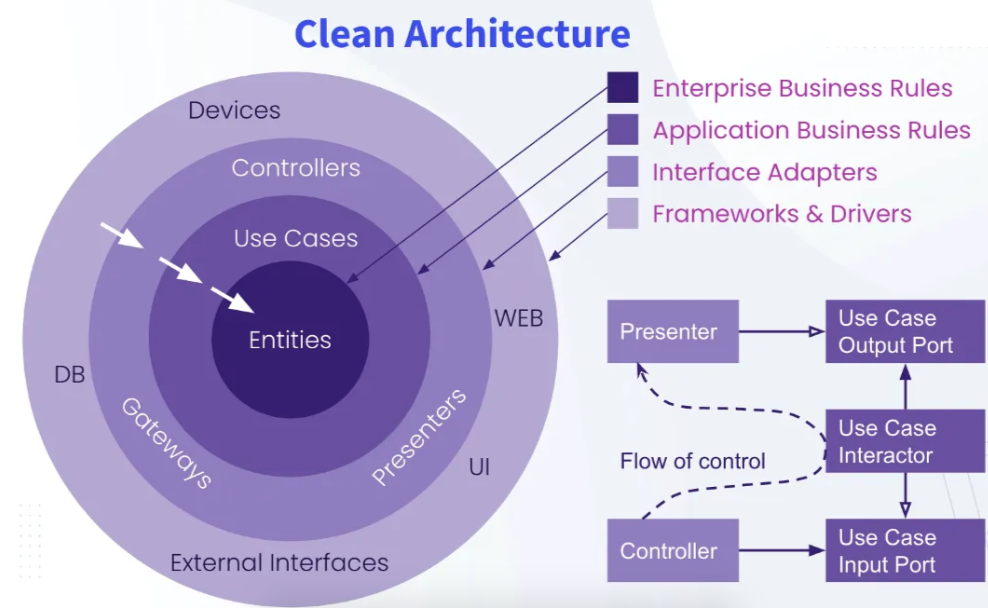
Inside a project with Clean architecture, the database (data persistency) is located in the most external layer, so we have to consider this Persistence as something that can't influence the domain or any other layer, it must be something independent that is there to save, get and manage the data from the database.
Our Persistence module is located in infra/persistence. As I explained, this project has two different databases (for a better exemplification), so this is a simple module, which receives parameters according to the interface, that will be used inside the register method.
interface DatabaseOptions {
    type: 'prisma' | 'mongoose';
    global?: boolean;
}
This is basically a wrapper class that has both modules, if you want to use Postgres or Mongo. The register will return a DynamicModule which can be used as a normal module. You can check it out in app.module.ts
So far, nothing new, or almost nothing new… We will see some similarities when open MongooseModule and PrismaModule
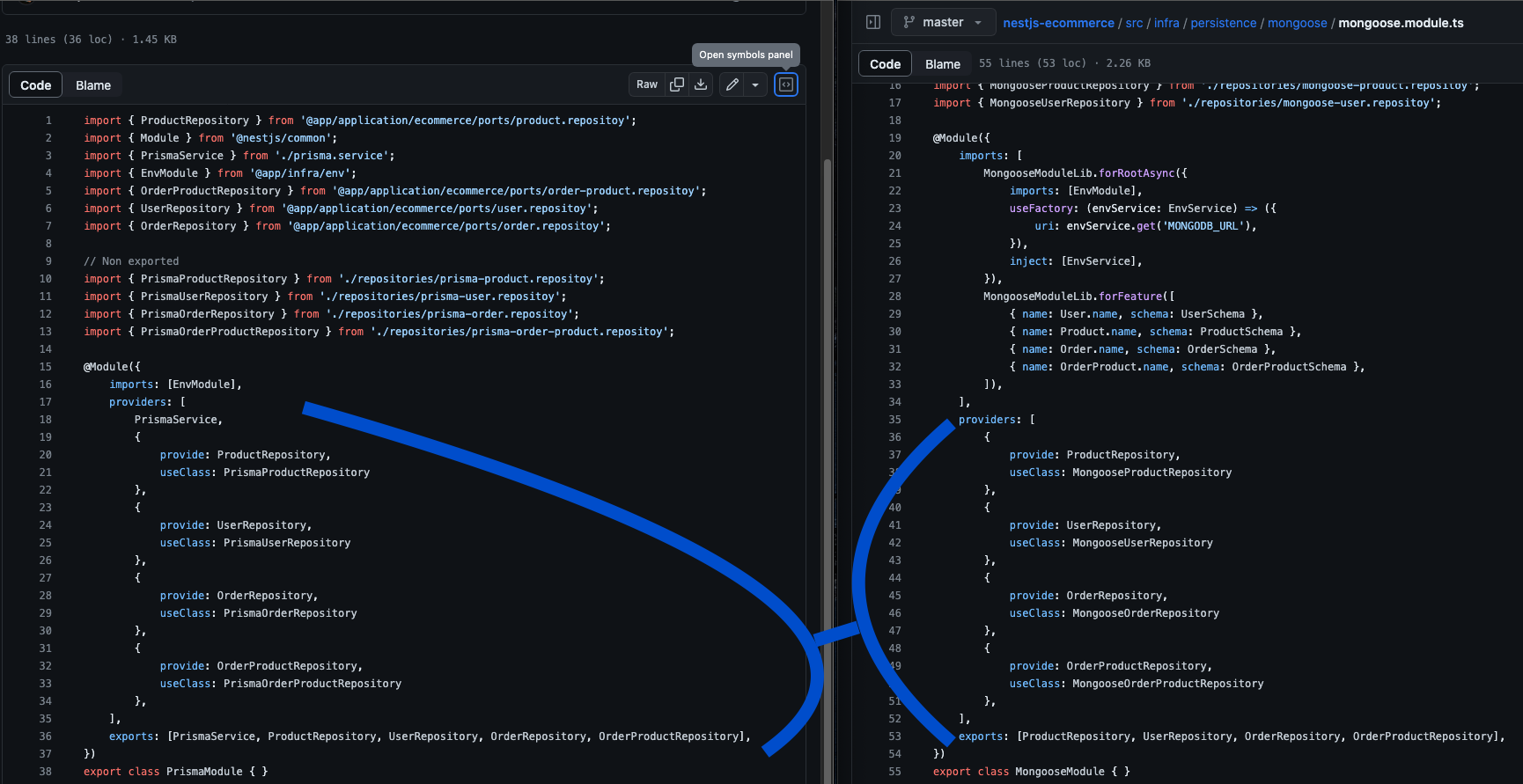
The providers are the same! I mean, the provide attribute for each one of the objects inside providers. Lets take a look at one as example
import { Order } from "@app/domain/ecommerce/order";

export abstract class OrderRepository {
    abstract findMany(): Promise<Order[]>;
    abstract findById(id: string): Promise<Order>;
    abstract create(data: Order): Promise<Order>;
    abstract update(id: string, data: Order): Promise<Order>;
}
Here we introduce an abstract class that standardizes data from any database type. We also use the Domain definition, which defines a class and its properties.
The attribute useClass in each module represents the class that implements this abstraction, adhering to input and output definitions.
This is one approach to creating a scalable, agnostic, and flexible persistence solution. For instance, each module will contain library elements related to the ORM, located only on the external layer of our graph. Subsequent use cases will utilize the exported repositories without needing to distinguish between databases, focusing solely on the data. Quite magical! 🧙♀️
I am not going to cover the code inside the Persistence module, because it is only the implementations of the entities and the responses by the respositories. Using the domain declarations inside the mappers of course.
Envs, HTTP, Payment and any other
The infra folder has other external layers and you can check out them here
Persistence and Payment has a similar structure where I tried to explain the core of the reusage.
Connecting the layers
In the previous post we went trouth an explanation of the layers being connected, so please take a look before dive deep into this new section (Previous post).
The high level explanation of the flow is
Controller → Use case → Entities
Breaking a little bit, it would be like this
- Source: https://github.com/henriqueweiand/nestjs-ecommerce/blob/master/src/app.module.ts
import { Module } from '@nestjs/common'; import { DevtoolsModule } from '@nestjs/devtools-integration'; import { EcommerceModule } from './application/ecommerce/ecommerce.module'; import { PersistenceModule } from './infra/persistence/persistence.module'; @Module({ imports: [ DevtoolsModule.register({ http: process.env.NODE_ENV !== 'production', }), PersistenceModule.register({ type: 'mongoose', global: true, }), EcommerceModule ], }) export class AppModule { } - Source: https://github.com/henriqueweiand/nestjs-ecommerce/blob/master/src/application/ecommerce/ecommerce.module.ts
import { HttpModule } from '@app/infra/http/http.module'; import { Module } from '@nestjs/common'; @Module({ imports: [HttpModule], controllers: [], providers: [], }) export class EcommerceModule { } - Source: https://github.com/henriqueweiand/nestjs-ecommerce/blob/master/src/infra/http/http.module.ts
import { Module } from '@nestjs/common'; import { CacheManagerModule } from '@app/infra/persistence/cache/cache.module'; import { OrderController } from './order.controller'; import { ProductController } from './product.controller'; import { UserController } from './user.controller'; import { CreateOrderUseCase } from '@app/application/ecommerce/use-case/create-order'; import { CreateProductUseCase } from '@app/application/ecommerce/use-case/create-product'; import { CreateUserUseCase } from '@app/application/ecommerce/use-case/create-user'; import { GetOrderUseCase } from '@app/application/ecommerce/use-case/get-order'; import { GetProductUseCase } from '@app/application/ecommerce/use-case/get-product'; import { GetUserUseCase } from '@app/application/ecommerce/use-case/get-user'; import { CheckoutUrlUseCase } from '@app/application/ecommerce/use-case/checkout-url'; import { CheckoutController } from './checkout.controller'; import { PaymentModule } from '../payment/payment.module'; import { GetOrdersUseCase } from '@app/application/ecommerce/use-case/get-orders'; import { CheckoutCompleteUseCase } from '@app/application/ecommerce/use-case/checkout-complete'; import { AppController } from './app.controller'; @Module({ imports: [PaymentModule, CacheManagerModule], controllers: [AppController, ProductController, UserController, OrderController, CheckoutController], providers: [CreateProductUseCase, GetProductUseCase, CreateUserUseCase, GetUserUseCase, GetOrderUseCase, GetOrdersUseCase, CreateOrderUseCase, CheckoutUrlUseCase, CheckoutCompleteUseCase], exports: [], }) export class HttpModule { } - Source: https://github.com/henriqueweiand/nestjs-ecommerce/blob/master/src/infra/http/product.controller.ts
import { CreateProductUseCase } from '@app/application/ecommerce/use-case/create-product'; import { GetProductUseCase } from '@app/application/ecommerce/use-case/get-product'; import { CacheKey } from '@nestjs/cache-manager'; import { Body, Controller, Get, Post, UseInterceptors } from '@nestjs/common'; import { ApiTags } from '@nestjs/swagger'; import { HttpCacheInterceptor } from '../persistence/cache/interceptor/http-cache.interceptor'; import { CreateProductDto } from './dto/create-product.dto'; @Controller('/product') @ApiTags('Product') export class ProductController { constructor( private createProductUseCase: CreateProductUseCase, private getProductUseCase: GetProductUseCase, ) { } @Get('') @CacheKey('products') @UseInterceptors(HttpCacheInterceptor) async getAll() { const response = this.getProductUseCase.execute({}); return response; } @Post('') create(@Body() createProductDto: CreateProductDto) { const response = this.createProductUseCase.execute(createProductDto); return response; } } - Source: https://github.com/henriqueweiand/nestjs-ecommerce/blob/master/src/application/ecommerce/use-case/create-product.ts
import { Product } from '@app/domain/ecommerce/product';
import { Injectable } from '@nestjs/common';
import { ProductRepository } from '../ports/product.repositoy';

interface CreateProductUseCaseCommand {
  title: string,
  price: number
}

@Injectable()
export class CreateProductUseCase {
  constructor(private productRepository: ProductRepository) { }

  async execute({
    title,
    price
  }: CreateProductUseCaseCommand): Promise<any> {

    const product = new Product({
      title,
      price
    })

    const response = await this.productRepository.create(product)

    return response;
  }
}
And looking at the use-case part we can see the data usage, logic and many things happening, for example
import { Order } from '@app/domain/ecommerce/order';
import { Injectable } from '@nestjs/common';
import { OrderRepository } from '../ports/order.repositoy';
import { OrderProduct } from '@app/domain/ecommerce/order-product';

interface CreateOrderUseCaseCommand {
  user: string,
  orderProduct: Pick<OrderProduct, 'product' | 'price'>[]
}

@Injectable()
export class CreateOrderUseCase {
  constructor(
    private orderRepository: OrderRepository,
  ) { }

  async execute({
    user,
    orderProduct
  }: CreateOrderUseCaseCommand): Promise<Order> {
    let total = 0;
    const order = new Order({
      user,
    })

    const createdOrderProduct = orderProduct.map((product) => {
      total += product.price;

      return new OrderProduct({
        product: product.product,
        price: product.price,
      });
    });

    order.total = total;
    order.orderProduct = createdOrderProduct;

    const createdOrder = await this.orderRepository.create(order)
    const response = await this.orderRepository.findById(createdOrder.id);

    return response;
  }
}
import { Order } from '@app/domain/ecommerce/order';
import { Injectable } from '@nestjs/common';
import { OrderRepository } from '../ports/order.repositoy';
import { OrderProduct } from '@app/domain/ecommerce/order-product';

interface CreateOrderUseCaseCommand {
  user: string,
  orderProduct: Pick<OrderProduct, 'product' | 'price'>[]
}

@Injectable()
export class CreateOrderUseCase {
  constructor(
    private orderRepository: OrderRepository,
  ) { }

  async execute({
    user,
    orderProduct
  }: CreateOrderUseCaseCommand): Promise<Order> {
    let total = 0;
    const order = new Order({
      user,
    })

    const createdOrderProduct = orderProduct.map((product) => {
      total += product.price;

      return new OrderProduct({
        product: product.product,
        price: product.price,
      });
    });

    order.total = total;
    order.orderProduct = createdOrderProduct;

    const createdOrder = await this.orderRepository.create(order)
    const response = await this.orderRepository.findById(createdOrder.id);

    return response;
  }
}
In this use-case, we are creating an order, so we have the input and inside the constructor, we are declaring the repository. Before we call the repository methods, we prepare the information according to the Domain and the abstraction. There's also some logic that calculates the total price of the order.
Here, we have a clear usage of the classes that represent the Domain, which also defines the way that the abstractions understand the interactions. Since our Domain is the main point of the whole application, it helps us to keep the data transition in harmony and flexible to be used and changed when necessary.
Conclusion
We've completed another section of the article. Regardless of whether you're using DDD, Clean Architecture, or any other approach, NestJS's ability to abstract is a powerful tool. It can help us build well-structured, flexible modules with a low level of coupling. I hope this main idea has come across clearly in this part.